
Batch manufacturing records
Batch manufacturing record (BMR) software
Record each batch against its approved master record as the work happens: weights, lots, checks, signatures and deviations, ready for a qualified person to review and release.
Batch record · lot B-2318
BMR preview- Master record MR-112 rev 4 issued to lot B-2318
- Sucrose lot S-9041 scanned, 25.02 kg from scale 3
- Mix temperature above limit at step 6
- Deviation DEV-207 opened from step 6
- Yield 98.4% of expected, shown for review
Not released. The deviation stays on the record for the reviewer's decision.
Master record, BMR or eBR?
The terms are often mixed up. This page is about the executed record for each batch.
Master record (MBR / MMR)
The approved instructions for a product: materials, quantities, steps, checks and limits. Changed only through change control.
Batch manufacturing record (BMR)
The record of one batch made from that master record: what was weighed, by whom, with which lots, which checks passed or failed and what was corrected.
Electronic batch record (eBR)
Either record kept electronically, with signatures and an audit trail. For eBR software in general, see the electronic batch record page.
Looking for electronic batch record software in general? Electronic batch record software.
One batch, from master record to decision
Step 1
Approve the master record
The recipe and instructions are approved with signatures. Only the current approved revision can be issued.
Step 2
Issue a BMR for the lot
The batch record is created from that revision, so steps and limits are not retyped.
Step 3
Dispense and weigh
Material lots are scanned and weights come from paired scales or a signed manual entry.
Step 4
Run steps and checks
Operators complete each step; out-of-range results and corrections stay on the record and can open a deviation from the step.
Step 5
Reconcile yield and materials
Expected against actual quantities are shown for the batch, so differences are visible before review.
Step 6
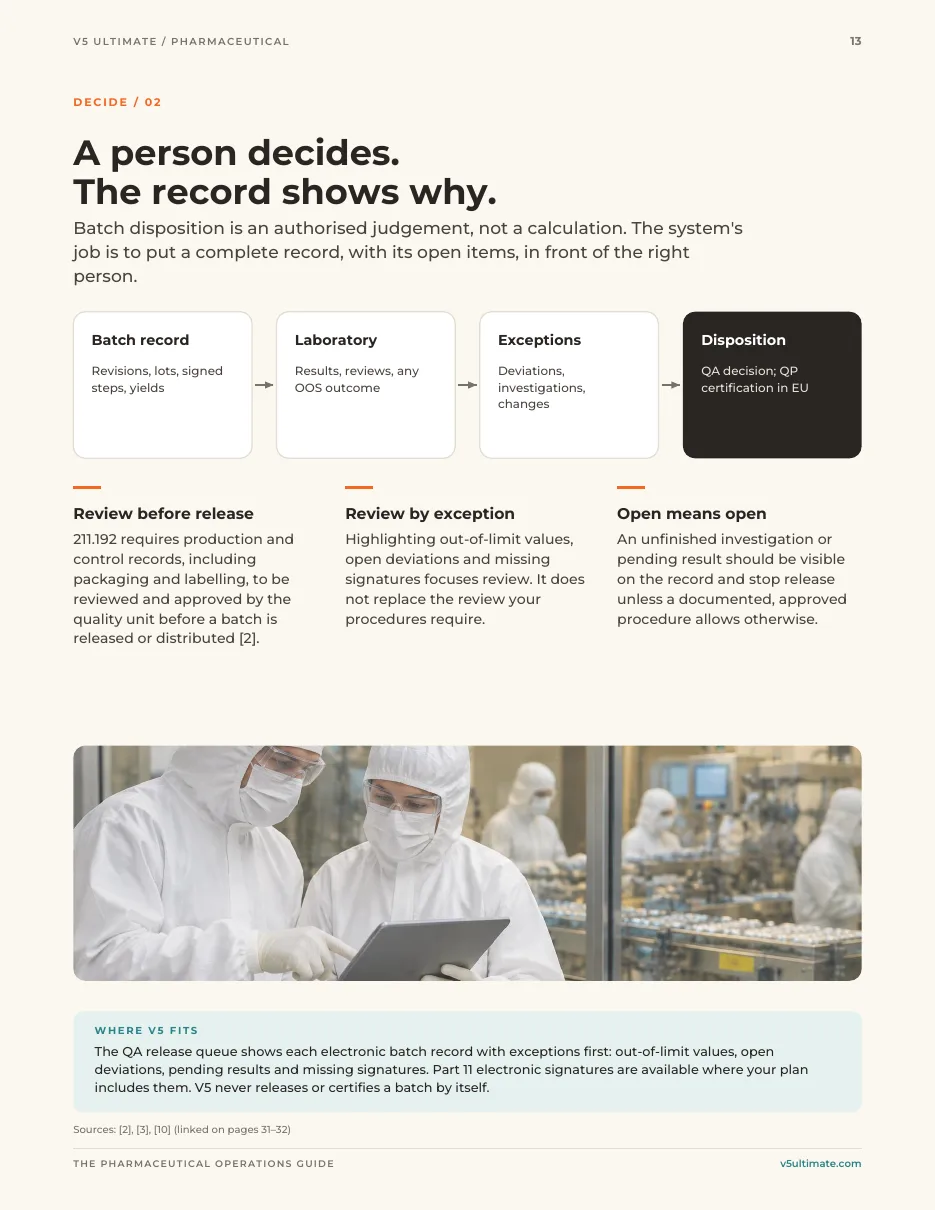
Review and decide
A qualified person reviews the record and its exceptions and signs the disposition. The BMR report is printed from the same record.
What to check when choosing BMR software
Master-to-batch link
Can a batch only be issued from an approved master revision, and does an in-progress batch keep the revision it started on?
Data captured at source
Which of your scales and instruments connect, and how is a manual entry signed and checked?
Exceptions on the record
Are out-of-range values, corrections and deviations visible to the reviewer without hunting through pages?
Signatures and audit trail
Do signatures show who, when and why, and can the audit trail be reviewed and exported for an inspection?
Fit with your procedures
How much of the record your reviewers must check is set by your procedures, not the software. Ask to see your own process configured.
Validation and support
Who provides IQ/OQ support (V5: Enterprise plan only) and what evidence your team still produces for intended use and PQ.
Deployment and validation
V5 runs hosted in the cloud or installed on premises. IQ/OQ and validation support is part of the Enterprise plan only. Your team stays responsible for validating V5 for your intended use, including PQ, for your procedures and for every release decision.
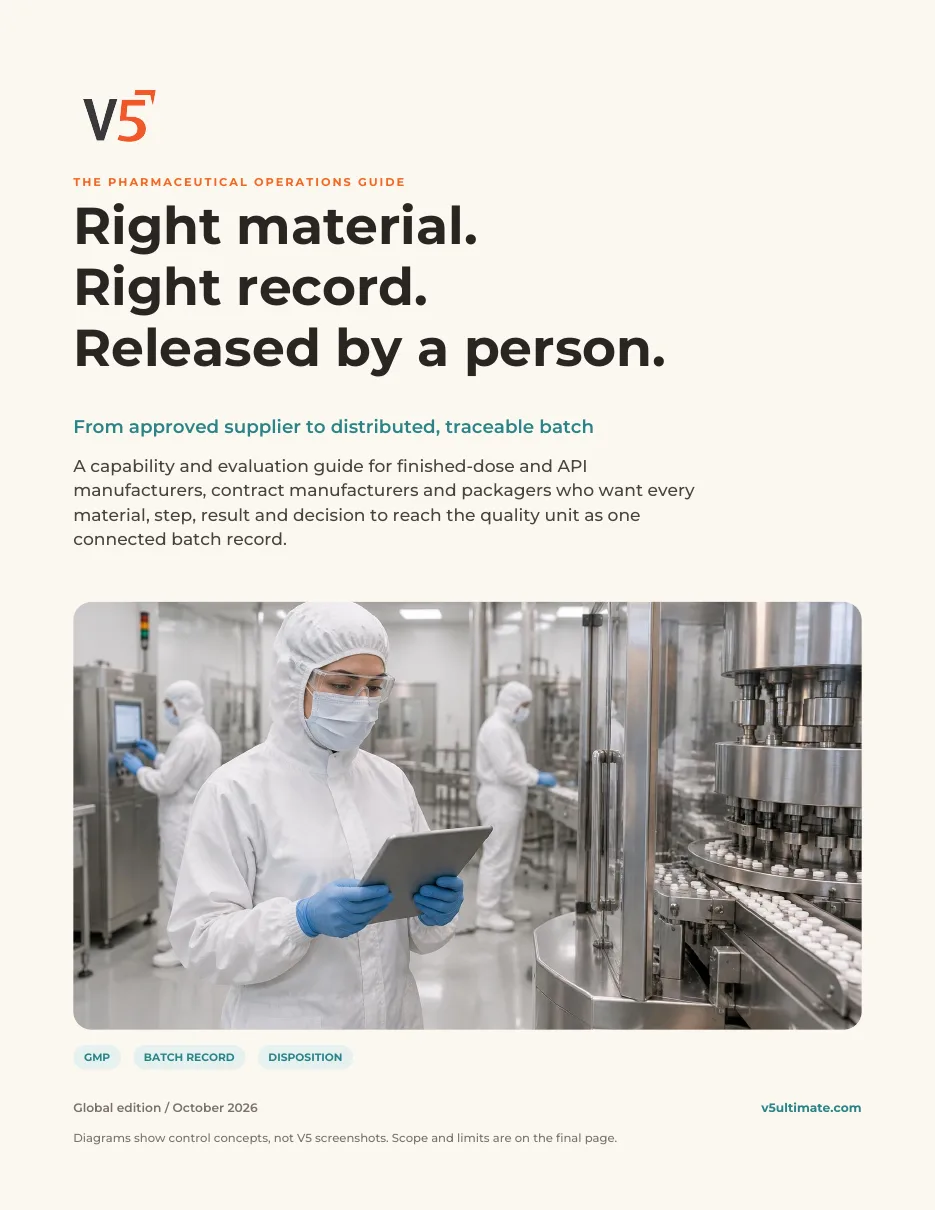
The Pharmaceutical Operations Guide
Right material. Right record. Released by a person.
33 pages · 4 worksheets · 16 primary sources
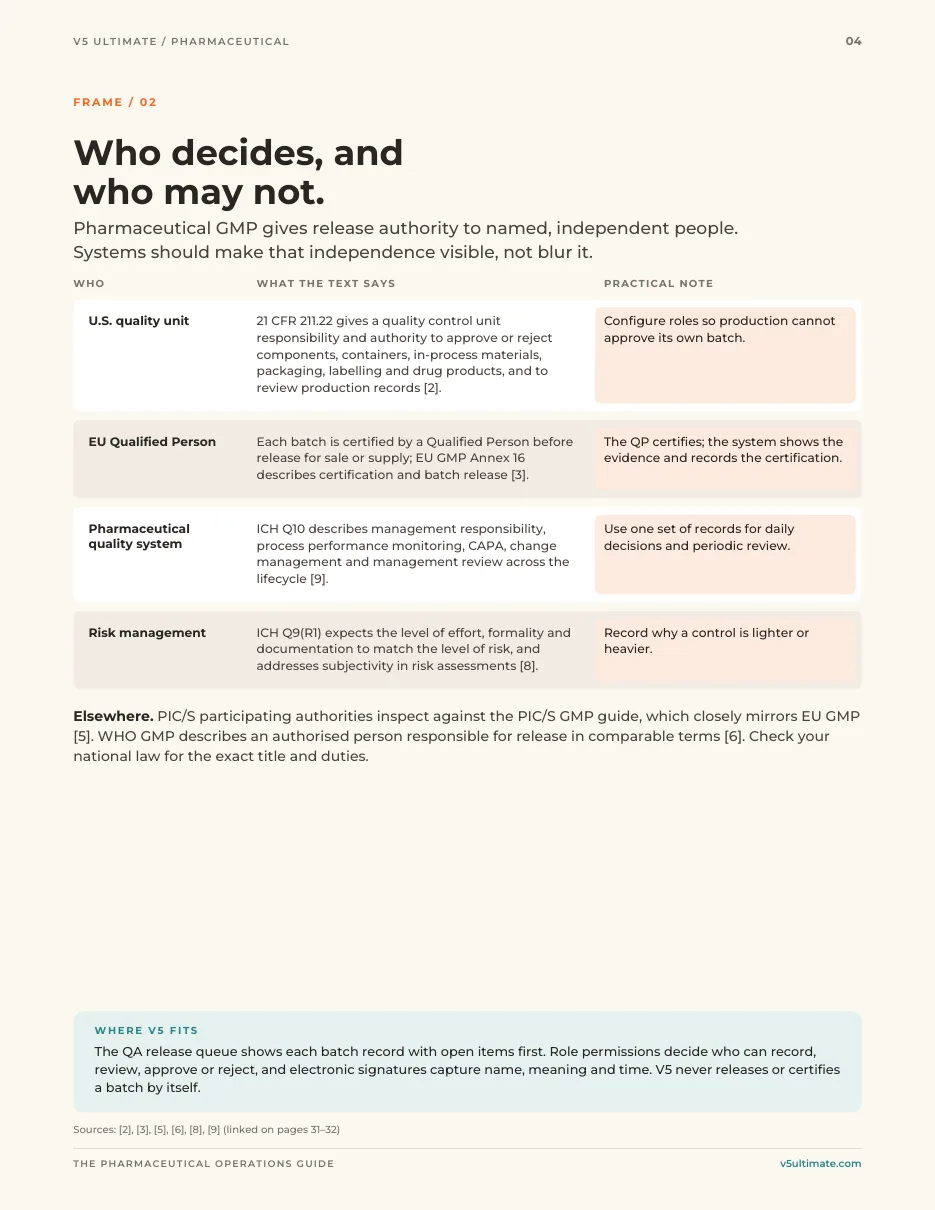
- Who decides, and who may not
- Supplier to finished bulk
- Test, review, investigate
- Packs, serialisation and recall
- Evidence map and four worksheets
Free. Just your name and email, and it downloads instantly.
We use your details to handle this request. Privacy policy. Practical orientation, not legal advice; your quality unit decides which rules apply.
Batch record questions
What is the difference between a master record, a BMR and an eBR?
The master record (often called the master batch record, MBR, or master manufacturing record, MMR) is the approved instructions for a product. The batch manufacturing record (BMR), also called a batch production record, is the filled-in record for one batch made from those instructions. An electronic batch record (eBR) is either of them kept electronically.
Does V5 decide whether a batch can be released?
No. V5 shows the completed record and any exceptions, such as out-of-range values, corrections and open deviations. A qualified person in your quality unit reviews the record and signs the decision under your procedures.
Can weights come straight from our scales?
V5 pairs with scales, printers, sensors and PLCs using Mettler SICS, Modbus TCP, OPC-UA and MQTT, with a live ingest test during setup. Equipment that cannot connect can be recorded by signed manual entry. Check your exact models with us before relying on a connection.
Does using V5 make our batch records compliant?
No software does that on its own. V5 provides electronic signatures, an audit trail and controlled records that support your quality system. Your procedures, your validation for intended use and your people's decisions determine compliance.
Is validation support included?
IQ/OQ and validation support is part of the Enterprise plan only. Your team remains responsible for validation for your intended use, including PQ, and for approving it.
Prepared by S.G. Systems, LLC, publisher of V5 Ultimate. Regulatory links checked 3 October 2026; which rules apply to your products is for your quality team to decide.
- 21 CFR 211.186 — Master production and control records (eCFR)
- 21 CFR 211.188 — Batch production and control records (eCFR)
- 21 CFR 211.192 — Production record review (eCFR)
- 21 CFR Part 111 subpart P — Records for dietary supplements, incl. 111.255–111.260 (eCFR)
- 21 CFR Part 11 — Electronic records; electronic signatures (eCFR)