
Know what you have. Trust where it goes.
Every receipt, move, pick and count is recorded against a lot and a location. So you can say where any lot is now, and where it went.
7-day free trial, no card required. Warehouse operations are in every plan.

See your stock the way it sits
Every location, every lot, and which bags you can really use today.
What can you actually use?
Try it: tap a location to see its lot. Then let an order ask for 30 bags.
- Lot
- G-2207
- Quantity
- 12 bags
- Status
- Available
- Expiry
- Jan 2027
- Order of use
- Use first
- Receipt PO-4471 · 3 Jun
- Lot label
- Move history
Explore the details: follow one lot from receipt to trace
Twelve bags arrive on PO-4471. See what V5 records at each step.
Tap a step below to see what happens.Choose a step below to see what happens.
Step 1 of 6
- Ordered / received12 / 12 bags
- Supplier lotSL-88
- V5 lotL-2291
- Container labelsLP-2291-01 … 12 printed
Supplier lot SL-88 is now linked to this receipt.
Receive against the order
- Book each delivery against its open purchase order line, with quantity and unit checked at the dock.
- Record the supplier's lot and expiry, and attach their certificate to the lot.
Label printing needs a configured label printer.
More on receive: full record and set-up
Also on this record
- Expiry
- 31 Mar 2027
- Supplier certificate
- Attached to lot
Each bag, drum or pallet gets its own GS1-128 label, and all 12 belong to one lot.
- Purchase order, receipt and invoice
- Purchase orders, receiving and a three-way match of order, receipt and invoice are part of sales and purchasing.
- Reading paperwork from a photo
- Where Vision AI is switched on, it can read supplier labels, certificates and delivery notes from a photo. The receiver checks and confirms what it filled in.
- Barcodes you already have
- Existing barcodes carry over. Missing ones can be printed at receiving, so you can start without relabelling everything.
Start with the warehouse. Add more later.
Use V5 for receiving, put-away, picking and shipping on its own, with no manufacturing needed. When you're ready, the same lot records feed production, quality release and dispatch. Your ERP stays the financial record.
What's included
Core warehouse operations are in every plan. Where a feature needs Professional or Enterprise, it says so beside it. Compare plans
Receiving and labels
Book deliveries in and label every container.
Goods in against purchase orders · Three-way match · Lots and GS1-128 labels
Explore receiving
Receiving and labels
Book deliveries in and label every container.
Goods in against purchase orders · Three-way match · Lots and GS1-128 labels
- Goods in against purchase ordersQuantity, unit, supplier lot and expiry at the dock
- Three-way matchPurchase order, receipt and invoice
- Lots and GS1-128 labelsOne lot, a labelled identity for every container
- Label design and printingDrag-and-drop designer, ZPL/EPL, several printers
- Vision AI for paperworkReads supplier labels, certificates and delivery notes; a person confirms
Storage and control
Know where each lot is and whether it can be used.
Put-away, bins and zones · Transfers and replenishment · Stock status and permissions
Explore stock control
Storage and control
Know where each lot is and whether it can be used.
Put-away, bins and zones · Transfers and replenishment · Stock status and permissions
- Put-away, bins and zonesTemperature class and starting status per zone
- Transfers and replenishmentScanned moves between locations
- Stock status and permissionsQuarantine, available, on hold; signed changes
- Cycle countingDifferences reviewed before adjustment
- Multi-warehouseEnterpriseSeveral warehouses in one workspace
Picking and dispatch
Send out the right lot and the paperwork with it.
FEFO / FIFO pick lists · Material issue to production · Pack, load and documents
Explore picking and dispatch
Picking and dispatch
Send out the right lot and the paperwork with it.
FEFO / FIFO pick lists · Material issue to production · Pack, load and documents
- FEFO / FIFO pick listsLots ordered by expiry or receipt date
- Material issue to productionScanned against the work order
- Pack, load and documentsPick lists, bills of lading, lot trace reports
- EDI and advance ship noticesProfessional and EnterpriseX12 messages, GS1-128 SSCC pallet labels
Trace, insight and connections
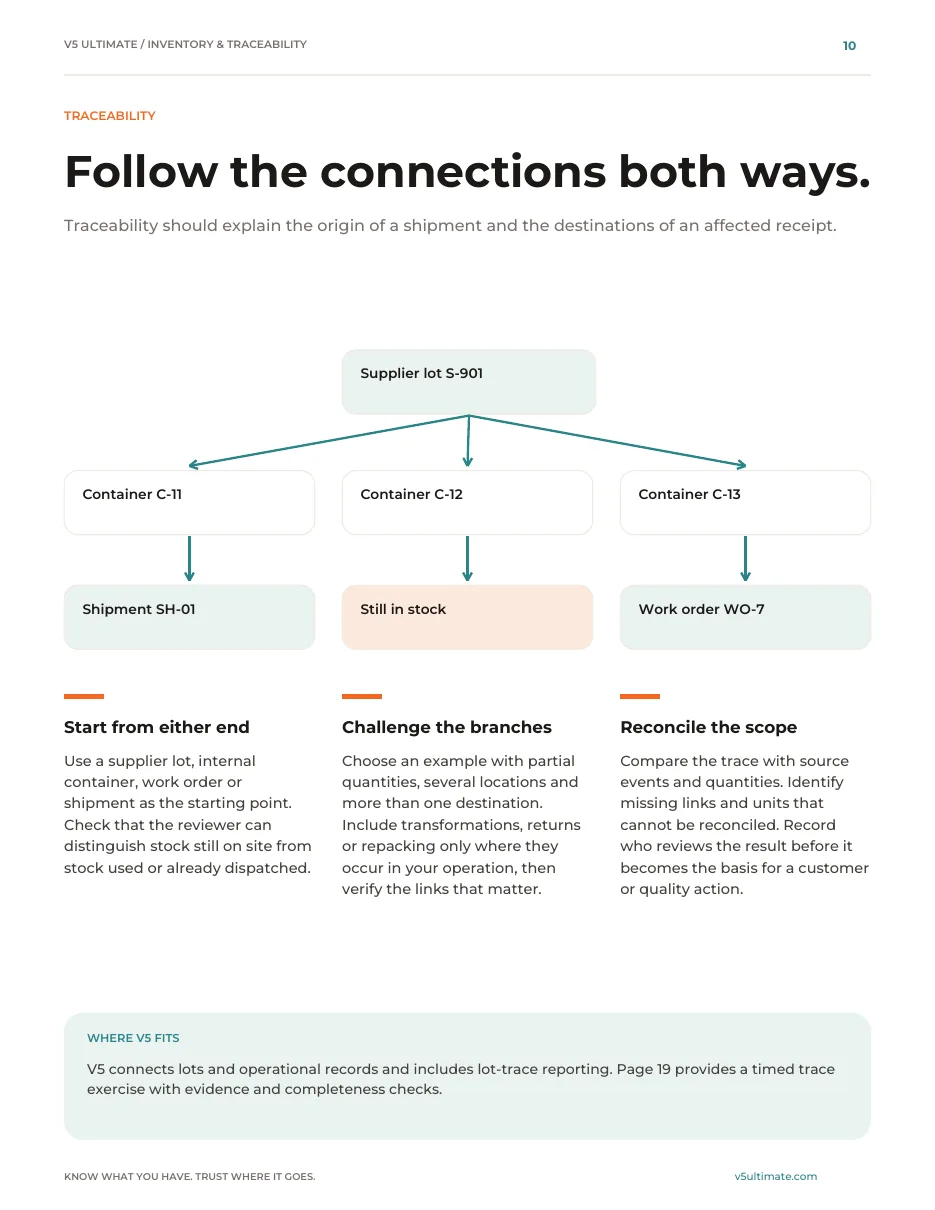
Follow any lot both ways and share it where needed.
Forward and back trace · V5 Assistant · Reorder AI
Explore trace and connections
Trace, insight and connections
Follow any lot both ways and share it where needed.
Forward and back trace · V5 Assistant · Reorder AI
- Forward and back traceSupplier lot ↔ work orders ↔ shipments
- V5 AssistantFinds lots, lists what expires soon, opens the record
- Reorder AIProfessional and EnterpriseSuggested orders from consumption, lead time and safety stock
- Customer and supplier portalsProfessional and EnterpriseLot trace and documents for customers; submissions from suppliers
- EPCIS 2.0 publishingProfessional and EnterpriseShare traceability events with your repository
AI demand forecasting: coming soon, not available today. Scanners, printers, carriers and your ERP each need their own set-up.
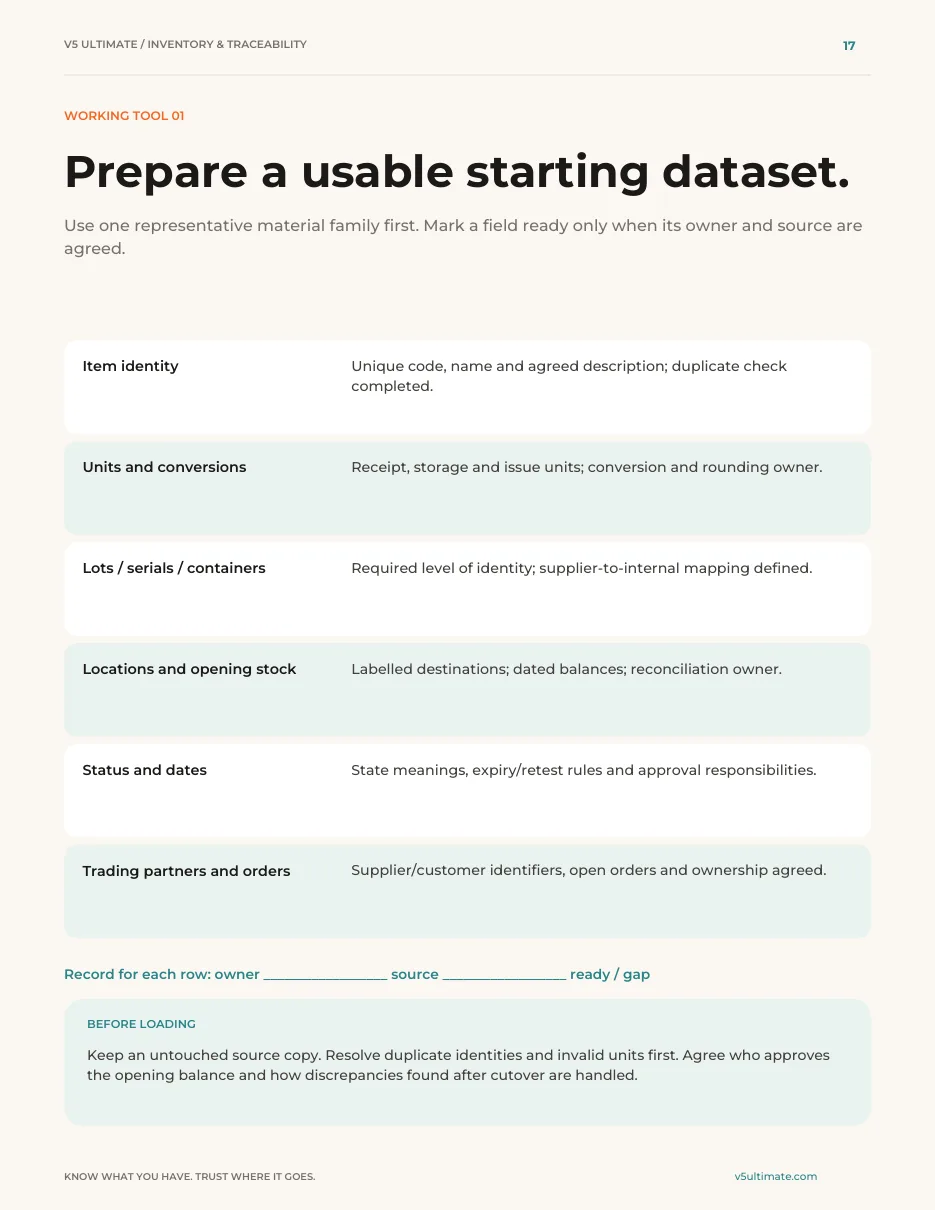

Your guide to connected inventory and traceability.
22 pages · PDF · 5 working tools
What you will learn
- Set up stock you can trust
Supplier lots, receiving, locations, status and counting, explained step by step.
- Trace and hand over with confidence
Picking, forward and back trace, and the handover to quality.
- Roll out and measure it
Planning, integrations and a rollout you can judge on your own data.
Tools you can use
- Data readiness check
- Exception test checklist
- Timed trace challenge
- Trial scorecard
- Rollout plan
We ask for your name and email so we can handle this request. The PDF downloads in your browser. Privacy policy
Full contents
- Goods-in and supplier lots
- Locations, status, movements and counts
- Picking and dispatch
- Forward and back trace
- Handover to quality
- Planning, AI and integrations
- Rollout and measurement
Try it with your own stock.
Start your free trialOr (you can edit the question before sending) or .