
Keep your ERP. Add the floor record beneath it.
Your ERP keeps the finance record. V5 records the floor and exchanges only the records you agree, set up step by step.
7-day free trial, no card required. ERP and accounting connectors are in Professional and Enterprise.

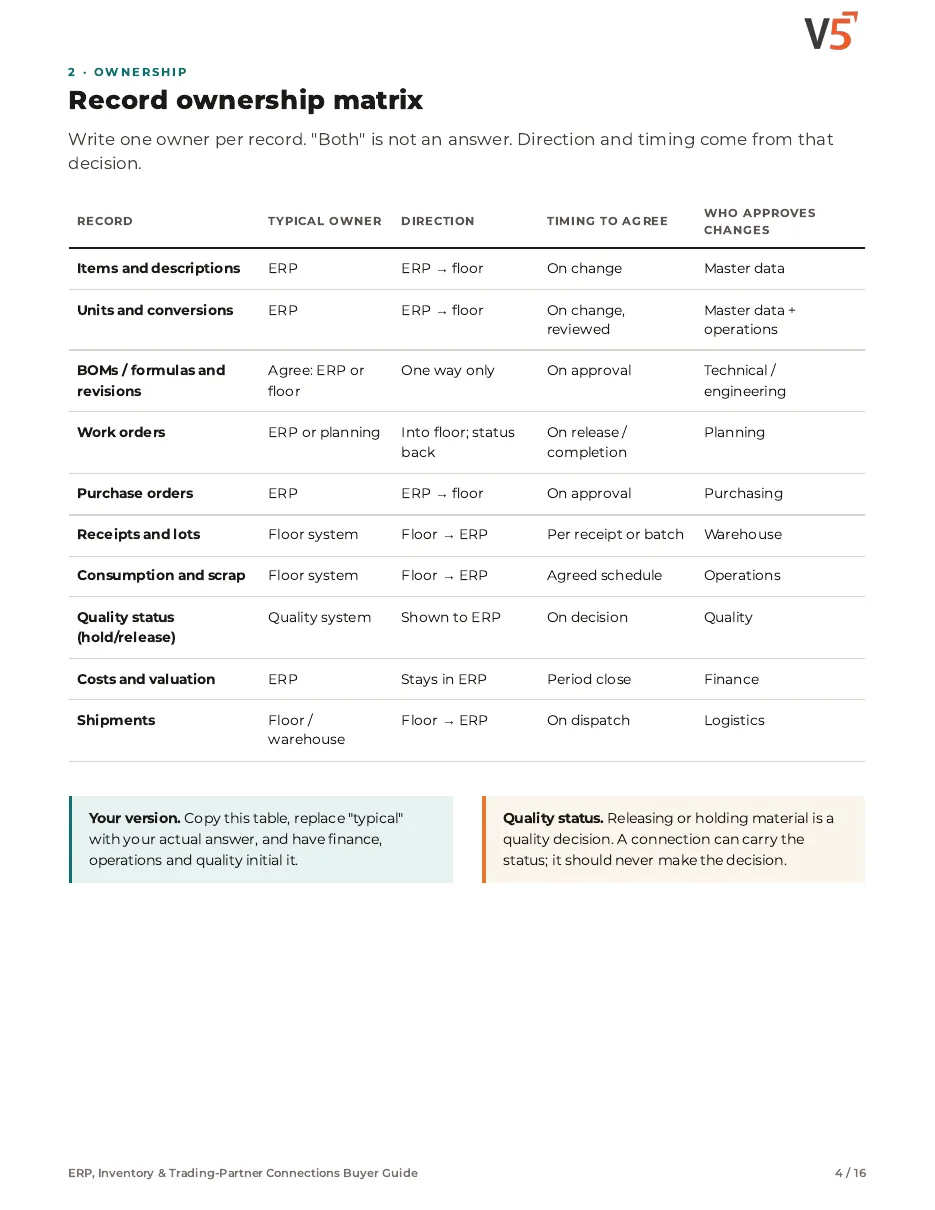
You choose the owner.
For each record, you agree which system creates it and which receives it.
People accept the mapping.
Suggested field mappings are reviewed and accepted before anything is written.
Dry run first.
Sample records are tested before go-live, with differences shown.
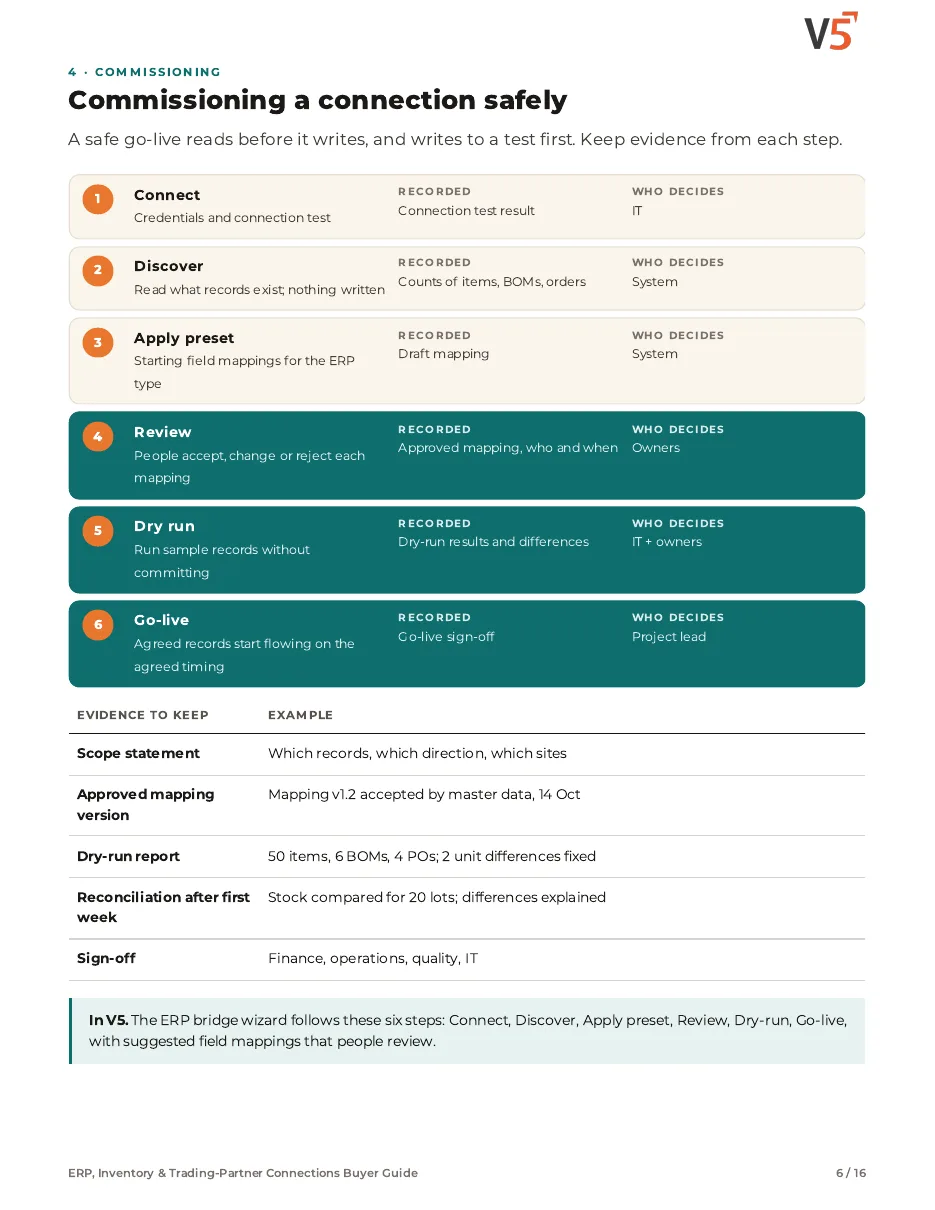
Follow one ERP bridge to go-live
A site connects its existing ERP: items and a bill of materials come down, and a finished work order goes back. Four stages.
See who owns the record, then fix the mismatch
Try it: resolve the unit difference, accept the mapping, then dry-run it.
Worked example. Which records move and how often is agreed per customer; your ERP stays the financial record.
Explore the details: every stage, with limits and set-up notes
Tap a step below to see what happens.Choose a step below to see what happens.
Step 1 of 4
- ConnectionTest passed
- Items found1,240
- Bills of materials86
- Open purchase orders31
Discovery reads; nothing is written.
Connect and discover
- The wizard connects to your ERP and tests the connection.
- It discovers what records exist before anything moves.
Confirm your ERP and version with us before you plan the project.
More on connect: full record and set-up
Also on this record
- Changes made
- None yet
Nothing is written during discovery.
- Accounting
- Which accounting platforms are connected today varies; confirm yours with us. A file-based exchange is available where no connector exists.
ERP, Inventory & Trading-Partner Connections Buyer Guide
For operations, finance, quality, supply chain and IT teams connecting floor records to an ERP, trading partners and suppliers. Use it with or without V5.
- 1Give every record one owner.
- 2Review each mapping before go-live.
- 3Dry-run before anything is written.
See what's inside
- Three choices before any connection
- Record ownership matrix
- Items, units and revisions
- Commissioning: discover, review, dry run, go-live
- Live inventory vs ERP posting state
- Exceptions to prove and a reconciliation sheet
- Trading-partner messages, pallets, labels and lots
- Supplier documents, review and corrective actions
- Access and change control, demo script, acceptance evidence and RFP
Chapters: three choices · record ownership matrix · items, units and revisions · commissioning safely · live inventory and ERP posting · exceptions to prove · reconciliation sheet · trading partners order to dispatch · pallets, labels and lots · supplier documents and corrective actions · access and change control · demonstration script · acceptance evidence and RFP · where V5 fits and sources.
We ask for your name and email so we can handle this request. The PDF downloads in your browser. Privacy policy
The bridge feeds the floor pages
Orders, stock and costs connect through it.
What's included
What the ERP bridge uses, and which plan each item needs. Compare plans
Connections
Connect, map, test, run.
ERP connectors · Accounting connectors · Sales & purchasing
Explore ERP integration
Connections
Connect, map, test, run.
ERP connectors · Accounting connectors · Sales & purchasing
- ERP connectorsProfessional and EnterpriseExchange agreed records with your ERP.
- Accounting connectorsProfessional and EnterpriseQuickBooks Online connects today; confirm other accounting systems with us.
- Sales & purchasingOrders inside V5.
- Basic APIProfessional and EnterpriseFor other systems.
- File-based exchangeAvailability to confirmMapped CSV import, and export for supported record types, where no connector exists.
Availability to confirm: the capability exists in V5, but which plans include it, and whether it is enabled for you, is not yet confirmed — ask us. Your team approves mappings and go-live. The ERP stays the financial record.
Plan the bridge to your own ERP.
Start your free trialOr (you can edit the question before sending) or .