
A clear next step for operators. A review-ready record at the end.
V5's manufacturing execution software (MES) puts the approved instructions on a shop-floor screen, one step at a time. Checks, materials and sign-offs are recorded as the work happens, so whoever reviews the job sees the evidence in one place.
7-day free trial, no card required. Work orders, scheduling and the operator kiosk are in every plan.

The approved way, on screen
Operators see the instructions in force for this job, one step at a time, instead of an old printout or memory.
Checks recorded at the step
Readings, materials and sign-offs are captured as the work happens, with who and when, rather than written up afterwards.
Review starts with exceptions
When the job ends, the reviewer sees what is complete and what needs a decision. A person still decides release.
What the operator sees. What the reviewer gets.
One packing job: the operator's next action, and the evidence building up for review as each step is confirmed.
One job from release to record—every step, quantity and lot captured as it happens.
Text summary of this animation (7 steps)
- Select the job. On the Line 2 kiosk the operator opens WO-2207: 400 cartons of FG-310, instructions revision C.
- Check readiness. Before the first step: component lots released, the line check gauge in calibration, the operator trained on revision C.
- Load components. Step 3 of 7: the operator scans component CMP-118, lot K-4410. It matches what the step expects.
- Run the line. Cartons run through filling and sealing; the count climbs toward 400.
- Record actual quantity. The operator records 400 good cartons. Component stock goes down; finished lot FG-310-0930 goes up.
- Output to stock. The labelled finished pallet moves out of the line as lot FG-310-0930.
- Record ready for review. All 7 steps are signed and the production record is complete. It goes to the review queue; a person decides.
Worked example. The job runs on the instruction revision in force when it was released; later edits need a new revision. Scanning the wrong item or a held lot stops the step, and equipment out of calibration can be blocked at the kiosk where configured. In-process checks show their limits; a result outside a limit is flagged, can pause the step and open a linked deviation. The production record comes from what was recorded; stage reviews and the final decision are signed by the people responsible, following your procedure.
Manufacturing Execution Buyer Guide
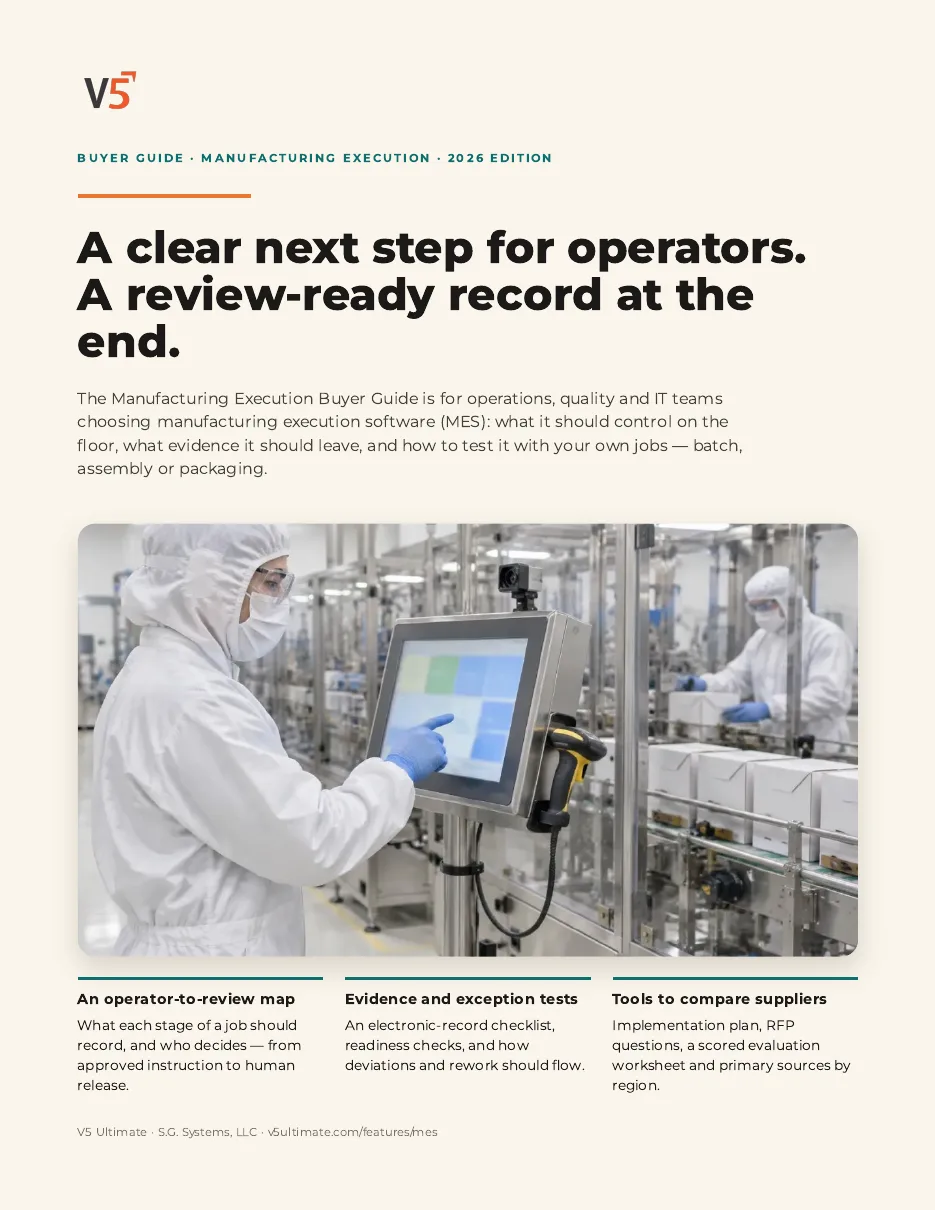
For operations, quality and IT teams choosing manufacturing execution software, whether you run batches, assembly or packaging. Use it with or without V5.
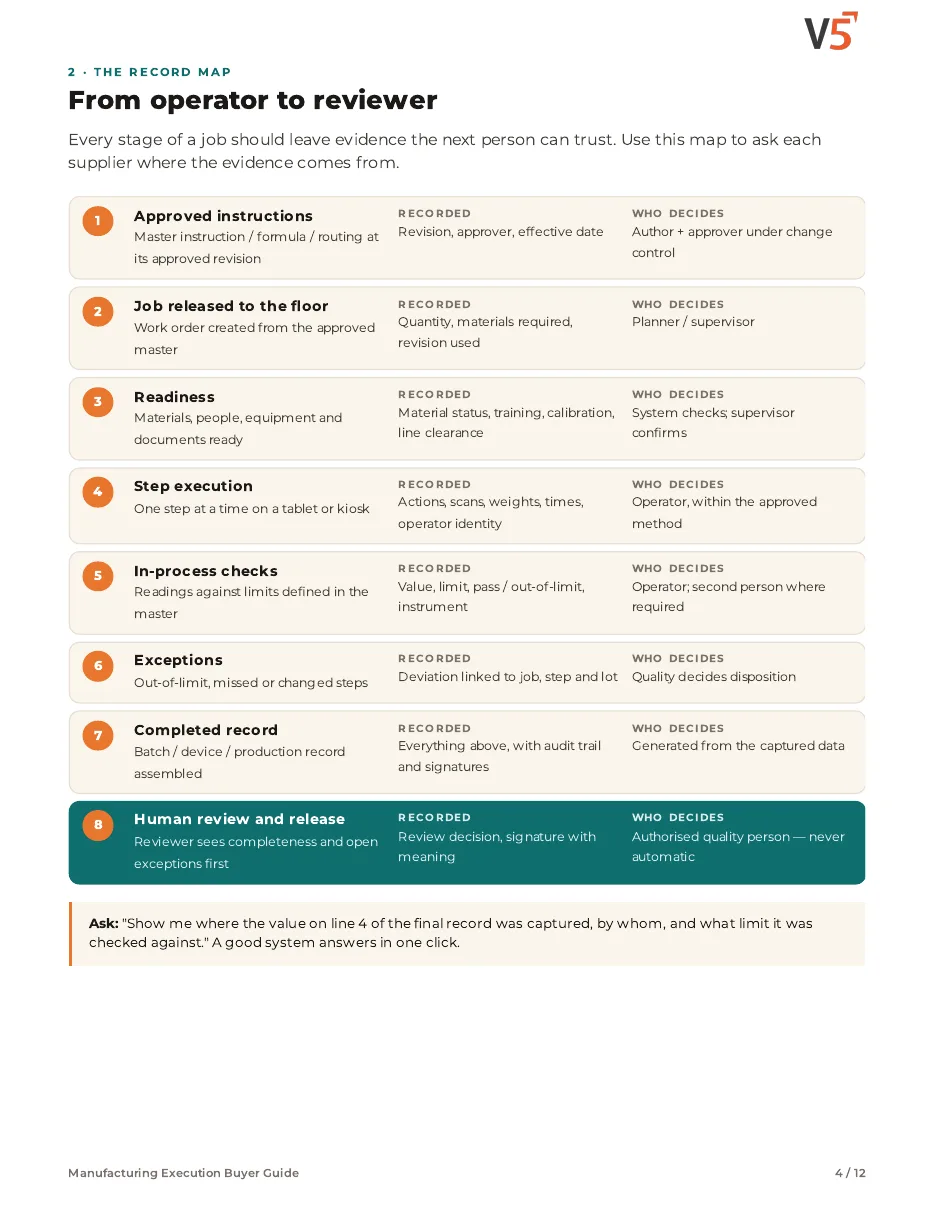
- 1Map every job stage from approved instruction to human release.
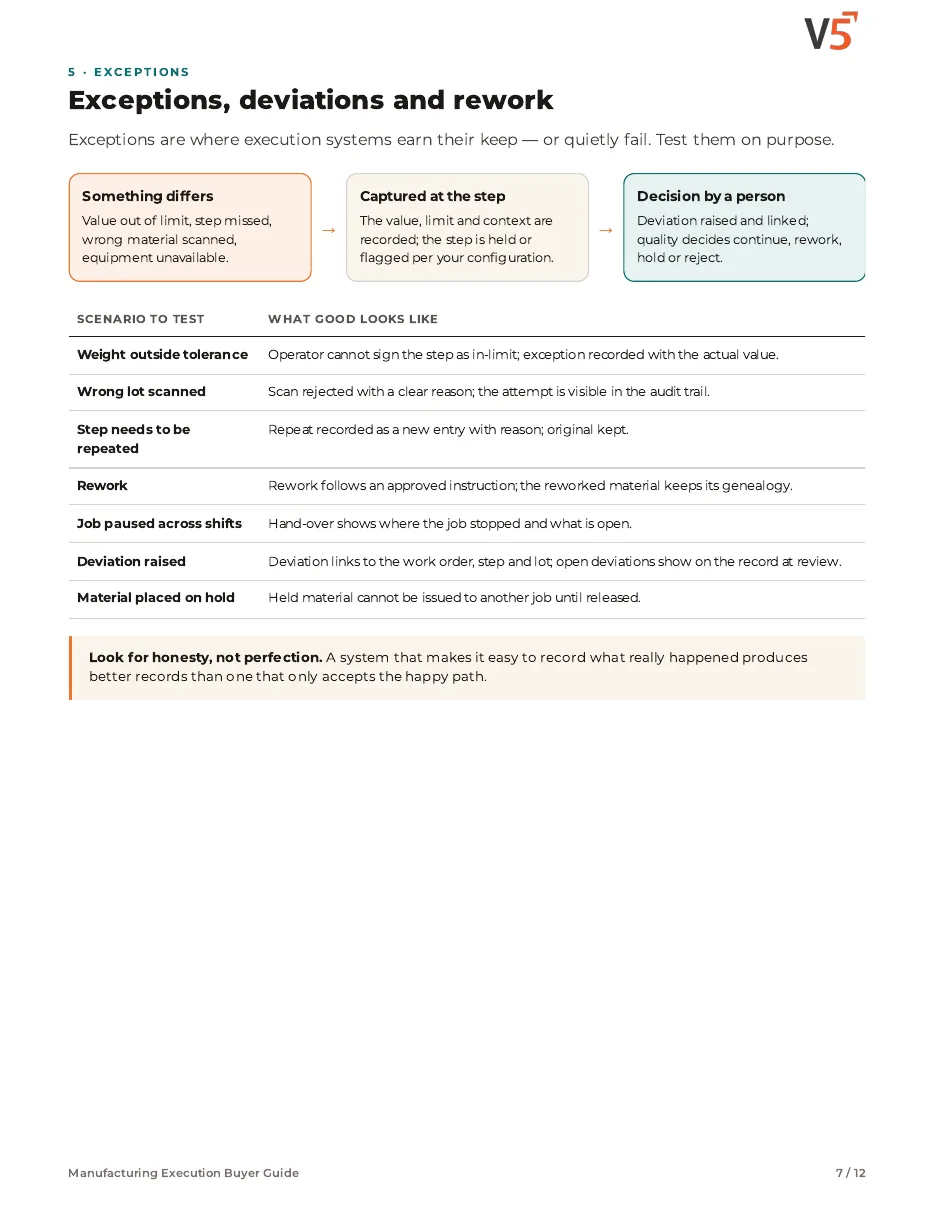
- 2Test exceptions on purpose: wrong lots, out-of-limit values, rework.
- 3Compare suppliers with RFP questions and a scored sheet.
See what's inside
- An eight-stage map from approved instruction to human release, showing what each stage should record and who decides.
- Tests to run on purpose: readiness checks, out-of-limit values, wrong lots, repeats, rework and corrections.
- Ready-to-use tools: an implementation plan, RFP questions, a scored evaluation sheet and primary sources by region.
Chapters: why execution control matters · from operator to reviewer · electronic record evidence checklist · readiness, procedures and human review · exceptions, deviations and rework · batch, assembly or packaging · change control and connected records · implementation plan and pitfalls · RFP questions and scored evaluation · where V5 fits and sources.
We ask for your name and email so we can handle this request. The PDF downloads in your browser. Privacy policy
Make anything. Not only batches.
V5 runs assembly, packing, filling, mixing and formulated production as steps with checks, so it fits whether you weigh ingredients or never touch a scale. Your ERP stays the financial record; V5 extends it down to the shop floor.
See quality managementSee inventory & traceabilitySee the whole product
What's included
Work orders, scheduling, the operator kiosk and calibration are in every plan. Where a feature needs Professional or Enterprise, it says so beside it. Compare plans
Plan and schedule
Decide what runs where and when, with materials ready.
Work orders · Visual scheduling · Material planning (MRP)
Explore planning
Plan and schedule
Decide what runs where and when, with materials ready.
Work orders · Visual scheduling · Material planning (MRP)
- Work ordersCreate, release and track work orders against the approved revision.
- Visual schedulingDrag-and-drop board with finite capacity, sequencing and shift calendars.
- Material planning (MRP)Suggestions from demand, stock and lead times, reviewed by a planner.
- Production floor modelModel sites, buildings, areas and workstations with the production setup wizard.
- Reorder suggestionsProfessional and EnterpriseSuggested purchase orders calculated from real consumption, lead time and safety stock; a person approves.
- Multiple sitesEnterpriseRun several sites in one workspace.
Instructions and recipes
Keep one approved way of doing each job.
Formulas and bills of materials · Step instructions and checklists · Draft from existing documents
Explore instructions
Instructions and recipes
Keep one approved way of doing each job.
Formulas and bills of materials · Step instructions and checklists · Draft from existing documents
- Formulas and bills of materialsUnder revision, used where you make to a formula.
- Step instructions and checklistsSteps, checks and limits for any kind of job, with or without a formula.
- Draft from existing documentsUpload an SOP, batch book or master record and V5 drafts formulas, checklists and work orders for review.
- Formula assistantDrafts a master formula from a target specification for a person to check.
- Industry terminologyIndustry packs adjust the kiosk, menus, wording and reports to your sector.
- Two-signature approvalsProfessional and EnterpriseRequire two approvers before a formula revision takes effect.
- Controlled documents and change controlProfessional and EnterpriseSOPs and work instructions under revision, with impact assessment and approvals.
Execution on the floor
Guide the operator and catch mistakes at the step.
Operator kiosk · Scan checks · Dispensing with connected scales
Explore execution
Execution on the floor
Guide the operator and catch mistakes at the step.
Operator kiosk · Scan checks · Dispensing with connected scales
- Operator kioskRole-based shop-floor screens with scanning and photo capture.
- Scan checksRight item, right lot and material status checked at the scan.
- Dispensing with connected scalesWhere your process weighs, capture weights with tolerance checks.
- Device pairingGuided pairing for scales, printers, sensors and controllers, with a live test.
- Calibration blockingOut-of-calibration equipment can block work order release.
- Labels at the lineDesign and print GS1-128 and other labels on configured printers.
- Training-based blockingProfessional and EnterpriseStop operators running steps they are not trained on, where configured.
- Maintenance and OEEProfessional and EnterprisePlanned maintenance, downtime reasons and equipment effectiveness.
- Sensors and IoTProfessional and EnterpriseLive process readings with alerts and logging.
- Skills matrixEnterpriseOperator-by-competency matrix, printable for review.
Records and review
Finish the job with the record already complete.
Production record from the steps · QA review queue and basic reports · Audit log (view)
Explore records
Records and review
Finish the job with the record already complete.
Production record from the steps · QA review queue and basic reports · Audit log (view)
- Production record from the stepsHeader, materials, steps, checks and exceptions recorded as the work happens.
- QA review queue and basic reportsCompleted work waits for a person to review it, with standard PDF reports.
- Audit log (view)See who changed what and when.
- Paper batch capturePhotograph paper travelers and map the data back onto the record for confirmation.
- Electronic signaturesProfessional and EnterpriseSignatures with meaning, designed for 21 CFR Part 11.
- Tamper-evident audit trailProfessional and EnterpriseAudit trail designed for ALCOA+ data integrity.
- Regulated reportsProfessional and EnterpriseBatch record, device history record, master record and certificate of analysis.
- Deviations from the stepProfessional and EnterpriseRaise a deviation linked to the work order, step and lot.
- Cost and varianceProfessional and EnterpriseStandard versus actual cost by batch, lot and product.
- IQ/OQ and validation supportEnterpriseOffered with Enterprise. Your own validation decides your validated state.
AI demand and yield forecasting, AI anomaly detection on process data: coming soon, not available today. Software features do not by themselves make you compliant or validated; your procedures and validation do. Devices and your ERP each need their own set-up.
Try it with one of your own jobs.
Start your free trialOr (you can edit the question before sending) or .